1. Internal business outreach tools

The internal business outreach tools that I present here are a set of small programs that scrape the internet for contact data and ultimately build contact lead lists for a sales team. The first one reads the public programme of a large event or conference and pulls out all of the relevant contact information from the website. The second program cross references those names against internal CRM data. The third builds structured spreadsheets with all of the contact data alongside relevant information from the company’s internal CRM data.

In March 2026 I joined the documentary film production studio and advocacy agency Film and Tell in Stockholm, working on internal operations, partnerships and sales. The outreach work needed tracking systems and more efficient ways to collect relevant leads for the sales processes. Nobody in the company had a technical background, so I built the necessary tools.

Most importantly these systems produced three sheets that were crucial for events and sales processes in Almedalen 2026, Sweden’s largest political gathering. With the programs I had built it was possible to know who would be there, at what time, what our previous relationship with this contact was and who we should invite to the events that we organised during the week. These programs were later modified to function in other use cases as well, like a list of 49 target organisations in another initiative, and for a similar pipeline focusing on the EHA 2026 conference in Stockholm.
Where
Film and Tell, Stockholm
Role
Operations Manager
Built with
Python 3.12, pandas, openpyxl, requests, Claude Code
Runs in
The terminal, with Excel workbooks as output
Code
github.com/strm0/lead-list-tools
Files dated
30 April to 20 May 2026

1.1 Why it was needed

Almedalen is Sweden’s largest political gathering, but also gathers people and organisations from all corners of industry in Sweden. There was a great need to optimise the schedule in order to book as many meetings as possible during the week. The public programme listed 2,240 events, each with names of the people taking part and organising each event. This information needed to be scraped, formatted in clean machine readable formats, cross referenced with existing Salesforce data in order to actually be useful.

The Salesforce data held years of meetings and useful information that could be utilised for booking meetings. Many of the people in the programme had met Film and Tell before. The data of those we had met before that were also going to be physically present during the Almedalen week was available, once the names had been matched with the scraped data from Almedalen’s website.

Nothing connected the two lists except the names as each side had typed them, and those never matched exactly.

1.2 Scraping the programme

The programme is server rendered HTML with no login and no JavaScript to wait for. The scraper read all 2,240 events and pulled 3,547 named people out of the participant and contact fields.

The first real use of the scraped contact data was to find people working for the various municipalities of Sweden. We were hosting two events where this was the target audience. The program matches each scraped person’s organisation against the official list of Swedish municipalities, handles the “stad” city and “kommun” municipality variants accordingly, and treats Region Gotland as a special case, since it is the only region that is also a municipality.

The filter found 81 municipality contacts. It writes three sheets: matched contacts, rejected people and parse issues to be checked manually. The two audit sheets are why the 81 can be trusted. Anyone can open them and see what the filter threw away.

Other uses for the scraped data were finding political figures that were relevant for a colleague as well as booking personal meetings for my boss.

Scrape

The scraper reads every event page of the programme and writes one row for each named person.

Filter

The filter asks: “does this person work for a municipality”, “is this person a political figure”.

Audit sheets

It writes what is kept and what it threw away. Anyone can open the rejects and check the filter.

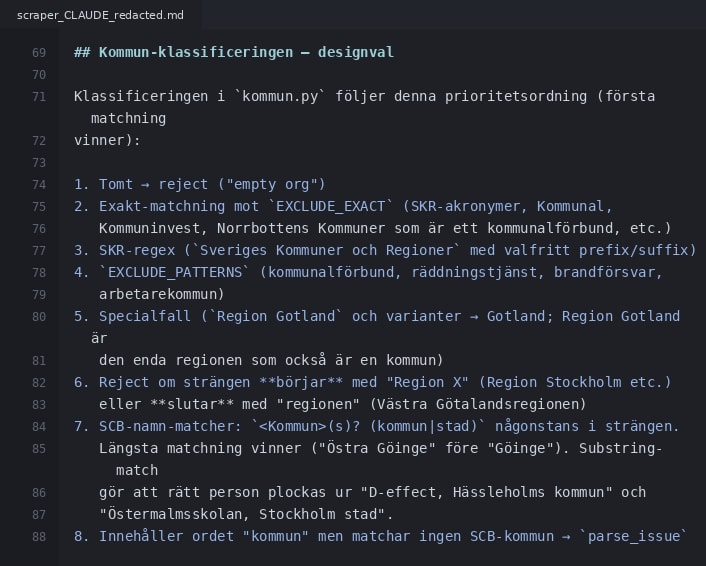
Rule ladder

Editor view of the scraper's CLAUDE.md, in Swedish: a numbered list of classification rules, from rejecting an empty organisation, through exclusion lists and the Region Gotland special case, to matching municipality names from the official list where the longest match wins.
The municipality rules as the scraper's CLAUDE.md documents them, in priority order. The first match wins.

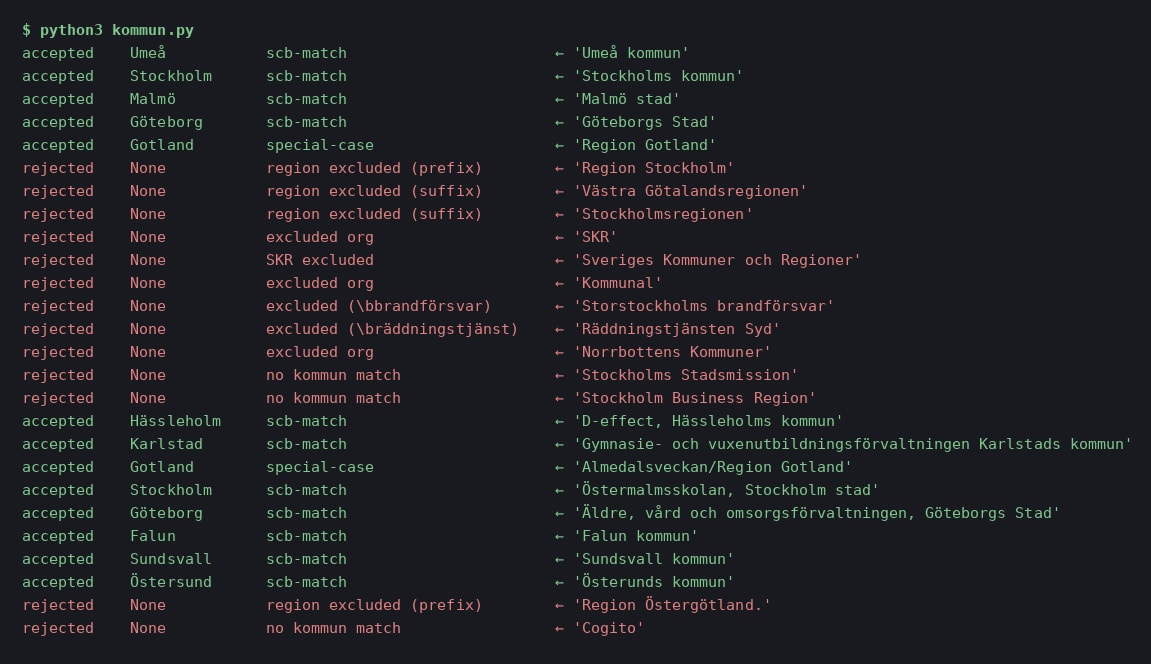
Self-test

Terminal output of the municipality classifier's self-test. Each line shows accepted in green or rejected in red, the municipality found, the rule that decided, and the original organisation string.
26 organisation strings through the classifier. Stockholms Stadsmission and Stockholm Business Region are rejected, and Östermalmsskolan, Stockholm stad is accepted a few lines below.

1.3 Names that never match

In a lot of the cases the same organisation appeared with small differences in spelling, usage of either ampersand or “and”, abbreviations or different casing and punctuation. The scrape presents the same company in one way and the Salesforce data might present that same company in a slightly different way.

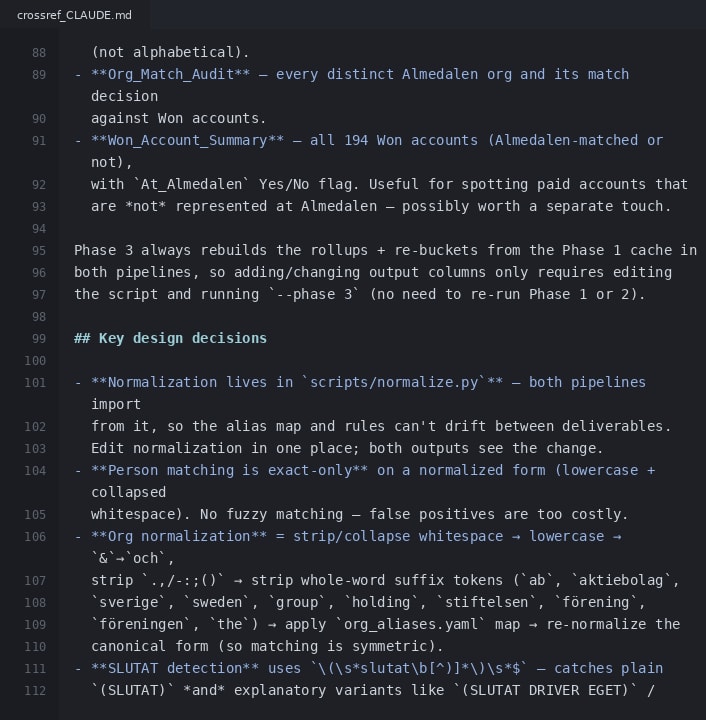
In the use case that I was building this system for, a wrong match costs more than a miss. Unsupervised fuzzy matching produces confident nonsense, so the pipeline does not fuzzy match at all. Instead it matches exactly, on normalised forms and asks a person about the rest. The normaliser collapses whitespace, lowercases, strips punctuation and the usual suffixes so that the matching stays symmetric. When a flagged mismatch has been recognised by a human this is documented in an alias table asset. It started at 18 entries and went up to 26 during the process.

The problem

The same organisation, typed by two different people. A computer recognises these as two separate organisations.

Rules

The rules write everything in lowercase, write “&” as “och”, and drop AB. Both sides now give the same key.

Alias table

No rule can know that EoP and Exempel & Partner AB are the same organisation. When a person writes this into the alias table once, this information is stored and can be used again.

Kept apart

The same rules apply for when two organisations need to be kept separate.

1.4 The human review step

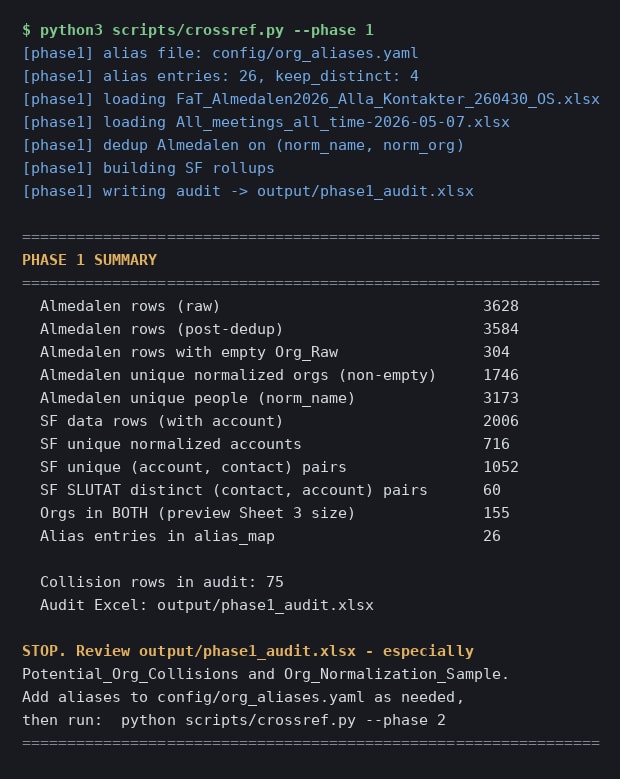
Phase one does the cheap work and then stops. It writes an audit workbook and prints an instruction to a person: review the potential collisions, add aliases to the table as needed, then run phase two. The pipeline does not continue on its own.

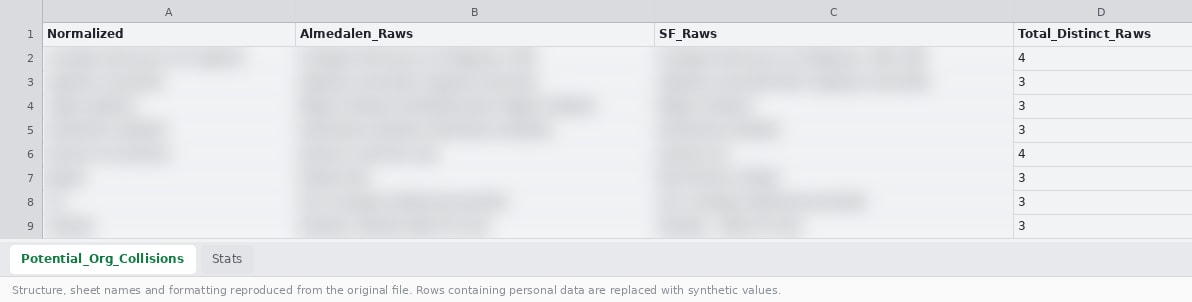
The review has to be small enough for a person to actually do. The audit lists only the collisions, these are the flagged contacts that need a human to confirm that the organisation has been matched correctly.

This costs a person’s attention every run and that is by design. Someone opens the audit workbook, reads the collisions, edits the alias table and runs phase two. This ensures that all of the contacts have been matched correctly.

Phase one

Phase one does the cheap work and writes an audit sheet that lists only the names that might collide.

The stop

After phase one the system stops and waits. The last line it prints is an instruction to the person doing the review.

Review

The person reads the collisions and writes what they learn into the alias table.

Phase two

When the review is done, the person starts phase two.

The output

Terminal output of crossref.py phase one: the files loaded, a summary of row counts ending in 75 collision rows, then STOP, review the audit workbook, add aliases as needed, then run phase two.
Phase one ends with STOP and the name of the workbook to review. The last line of the output is an instruction to a person.

Collisions

Spreadsheet view of the Potential_Org_Collisions sheet with four columns: the normalised key, the raw spellings from the Almedalen list, the raw spellings from Salesforce, and the number of distinct spellings. The names are blurred.
The review sheet: each normalised key with the raw spellings from both sources side by side, so the reviewer sees exactly what would merge.

1.5 Three sheets

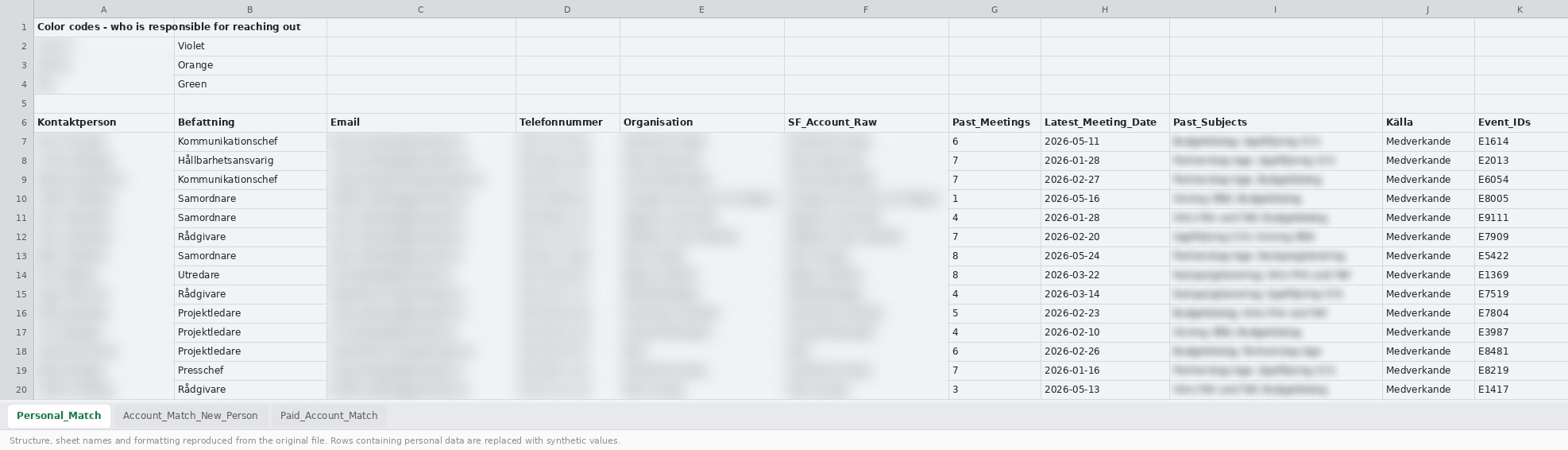
The outputs of phase two are three sheets. Personal_Match is a list of people that Film and Tell had met, with their meeting and context history. Account_Match_New_Person is a list of new people at known organisations. Paid_Account_Match is a list of organisations that have been paying partners in previous projects. It also lists the contact information of the person working at that organisation. This categorisation was made in order to demonstrate which contacts should be a priority to reach out to. A known person and a new person at a known organisation require different approaches in the outreach.

441 rows came out of the pipeline and 418 were used in the sales processes. The final deliverables were hand-finished after generation, including a colour legend that assigns each row to a person.

Known person

Personal_Match: Someone Film and Tell has already met. The sheet carries their meeting history and relevant context.

New person

Account_Match_New_Person: A new person at an organisation Film and Tell already knows.

Paid account

An organisation that has been or is a paying partner in one of Film and Tell’s initiatives.

Three emails

Each sheet gets its own kind of outreach strategy.

Personal match

Spreadsheet view of the Personal_Match sheet. A colour legend at the top says who is responsible for reaching out. Below it, rows with role, number of past meetings, latest meeting date and the source. Names, emails, phone numbers, organisations and past meeting subjects are blurred.
The Personal_Match sheet: contact, role, organisation, the Salesforce account it matched, past meetings, the latest date and its subjects, and the source.

1.6 Used again

This same pipeline was used for identifying various organisations and people of interest for many of my colleagues. These share the same normaliser and alias table, since the source is still the Almedalen 2026 website scrape.

A second scraper fed the same approach. It reads the platform of the European Hematology Association’s congress through its internal JSON API instead of its HTML, and returns 139 named speakers with their affiliation, and 113 sponsors in four tiers. This information was once again cross referenced to internal CRM data.

Shared

One alias table and one set of rules, three pipelines. A spelling fixed once is fixed in all three.

Second scraper

The same approach on a medical congress, read through the platform's JSON API.

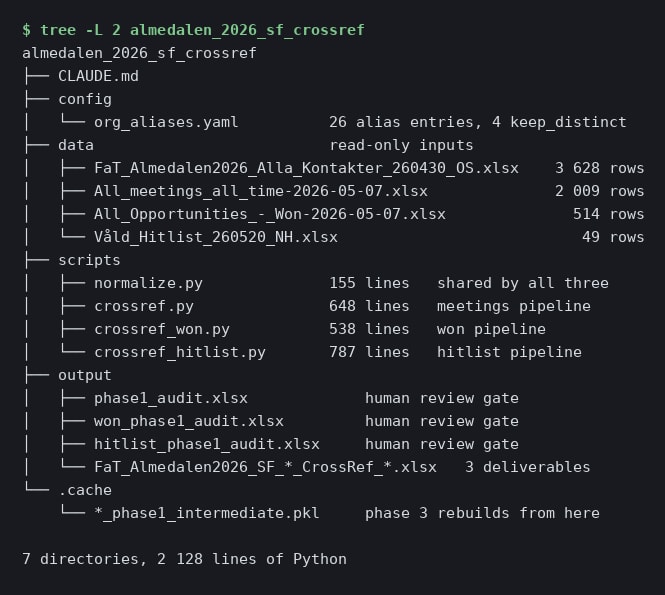
Layout

Terminal output of a tree command on the repository: CLAUDE.md, a config folder with org_aliases.yaml, four read-only input workbooks with their row counts, four scripts with their line counts, three review workbooks and the deliverables in output, and a cache. 2,128 lines of Python in total.
The repository: read-only inputs, four scripts sharing one normaliser, a review workbook per pipeline, and a cache that phase three rebuilds from.

1.7 Handing it over

The pipeline was handed over to five people with no engineering experience. This pipeline could be run through Claude Code and Cowork. I designed the pipeline and made the calls, Claude Code wrote most of the code. I debugged it and documented it in a CLAUDE.md that doubles as the handover, so colleagues can run it as well.

All in all it took about a week to have a functioning version of the pipeline. This system proved to be a big asset in booking meetings and organising the sales processes at Film and Tell.

Handover

Each project has a CLAUDE.md file. A colleague opens the repository through their AI harness of choice.

CLAUDE.md

Editor view of the pipeline's CLAUDE.md, the section headed Key design decisions: normalisation lives in one script that both pipelines import, person matching is exact only with no fuzzy matching, and the organisation normalisation steps in order.
The key design decisions section of the pipeline's CLAUDE.md: where normalisation lives, why person matching is exact only, and the order of the normalisation steps.

1.8 Credits

Design, architecture, debugging and documentation: Oscar Ström, Operations Manager at Film and Tell, Stockholm, March to September 2026. Joined as a partnerships and sales intern, promoted in late May 2026.

The code is written with Claude Code from my design.

Data and context: Film and Tell. The screenshots on this page are rendered from real runs and real documentation, with names, contact details and past meeting subjects blurred.